Ansible Vault Password from HashiCorp Vault – Wrapper Script
Once you have a Vault instance up (part 2), you can start using it for real workloads. Until everything in my repos is migrated to HashiCorp Vault, I still have playbooks and files encrypted with Ansible Vault. The downside: the Ansible Vault password has to live somewhere, and keeping it in a local file or environment variable is both a risk and a hassle when working from different machines.
The solution I use is a small wrapper script that fetches the Ansible Vault password from HashiCorp Vault and feeds it to ansible-playbook via --vault-password-file. That way the password is no longer stored locally – it comes from Vault on demand.
The Problem
With Ansible Vault you encrypt sensitive variables or files with a password. To run playbooks you need that password available, typically via:
--vault-password-filepointing to a script or file- Or
ANSIBLE_VAULT_PASSWORD_FILE
If the password sits in a plain file or in your shell config, it’s easy to leak (backups, sync, copy-paste). And if you work from multiple machines, you have to copy or replicate that secret everywhere. During a migration from Ansible Vault to HashiCorp Vault, you still need the old password for existing encrypted content – but you’d rather not keep it locally at all.
The Idea: Wrapper Script
Ansible can use a script as the vault password file. The script is executed by Ansible; whatever it prints to stdout is used as the password. So the flow is:
- You run
ansible-playbook ...(or setANSIBLE_VAULT_PASSWORD_FILEto the wrapper). - Ansible runs the wrapper script.
- The script authenticates to HashiCorp Vault (e.g. with your existing token or OIDC), reads the secret from a KV path, and prints the password to stdout.
- Ansible uses that output as the Ansible Vault password and decrypts the content.
No local password file – the secret stays in Vault and is fetched when needed.
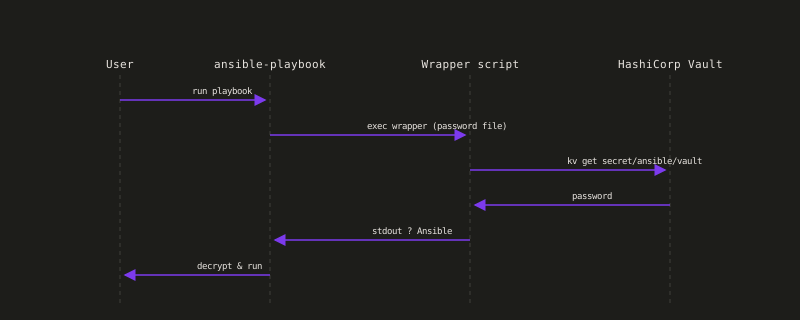
The diagram above shows the sequence: you run the playbook, Ansible executes the wrapper script, the script reads the secret from Vault’s KV store, and it is passed back to Ansible for decryption.
How the Wrapper Works
The wrapper script typically:
- Uses existing Vault auth – e.g.
VAULT_TOKENfrom your environment (from a previousvault loginor OIDC), or reads a token from a file. So you log in to Vault once (e.g. with vaultsh orvault login), and the wrapper reuses that session. - Reads the secret – e.g.
vault kv get -field=password secret/ansible/vaultor the equivalent API call. The exact path and field depend on where you stored the Ansible Vault password in Vault. - Prints only the password to stdout – no extra output, so Ansible gets a clean password string.
Example (conceptual):
#!/usr/bin/env bash
# Usage: set ANSIBLE_VAULT_PASSWORD_FILE=/path/to/this/script
vault kv get -field=password secret/ansible/vault
You’d add error handling (e.g. exit non-zero if Vault is unreachable or the secret is missing) so that Ansible doesn’t get a wrong or empty password.
Integrating with Ansible
Point Ansible at the script:
- One-off:
ansible-playbook site.yml --vault-password-file=/path/to/vault-pass-wrapper.sh - Default:
export ANSIBLE_VAULT_PASSWORD_FILE=/path/to/vault-pass-wrapper.sh
Then everyansible-playbook(andansible-vault) call uses it.
The script must be executable and must output only the password (no newlines or extra text if your secret doesn’t include them).
Benefits
- No local password – The Ansible Vault password isn’t stored on disk; it’s in Vault and fetched when you run playbooks.
- Single source of truth – Change the password in Vault once; all machines using the wrapper get the new value after the next run.
- Gradual migration – You can keep using Ansible Vault for existing encrypted files while moving new secrets into HashiCorp Vault. When everything is migrated, you can phase out the wrapper.
Limits and When to Phase It Out
The wrapper is a bridge: it lets you stop storing the Ansible Vault password locally while you still have playbooks or files encrypted with Ansible Vault. Once you’ve moved all those secrets into HashiCorp Vault (e.g. via lookup plugins or other integration), you no longer need the Ansible Vault password at all and can remove the wrapper.
Until then, you still depend on Vault being available and on having a valid Vault token (or other auth) when running Ansible – so your CI or other automation needs to authenticate to Vault before calling Ansible.
Up Next
In part 4 I introduce vaultsh – a CLI wrapper I built for day-to-day Vault use: OIDC login, token/session checks, KV read/write, and diagnostics, so you spend less time juggling raw vault commands.
Related Articles
Deploying HashiCorp Vault with Ansible
March 6, 2026
How I deploy a Vault instance with Ansible – reproducible, documented, and ready for your first secrets
From DevOps to DevSecOps: Practical Lessons from the Trenches
March 9, 2026
How a hands-on DevSecOps certification and several real projects – Python tasks, a Django shop, APIs and infrastructure automation – changed the way I think about security.
vaultsh: CLI Wrapper for HashiCorp Vault
March 8, 2026
A standalone CLI wrapper that bundles common Vault admin tasks: OIDC login, session checks, KV read/write, and diagnostics, with native Python menus (arrow keys, shortcuts)