Persistent XSS Through APIs: A Practical Analysis
Cross-Site Scripting (XSS) remains one of the most common web application vulnerabilities, consistently ranking in the OWASP Top 10. While many developers are aware of XSS vulnerabilities in traditional web forms, API endpoints are often overlooked as potential attack vectors. In this article, I’ll demonstrate how persistent XSS can be injected through API endpoints and show you how to prevent these attacks.
What is Persistent XSS?
Persistent XSS (also known as Stored XSS) is a type of Cross-Site Scripting attack where malicious scripts are permanently stored on the target server, typically in a database. Unlike reflected XSS, which only executes when a specific request is made, persistent XSS payloads are stored and executed every time the affected content is viewed.
This makes persistent XSS particularly dangerous because it can affect multiple users over an extended period without requiring the attacker to craft specific requests for each victim. Once the payload is stored, it will execute for anyone who views the compromised content.
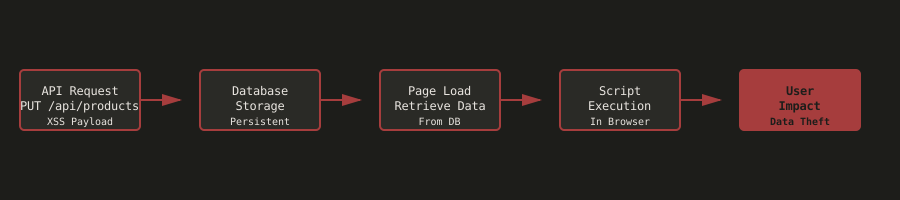
The diagram above illustrates how persistent XSS attacks work through API endpoints: a malicious payload is sent via an API request, stored in the database, retrieved when pages load, and executed in users’ browsers, causing widespread impact.
Stored vs Reflected XSS Comparison
| Aspect | Stored XSS (Persistent) | Reflected XSS (Non-Persistent) |
|---|---|---|
| Storage Location | Server database, file system | Not stored, only in response |
| Execution Trigger | Every time content is viewed | Only when specific request is made |
| User Impact | All users viewing content | Only the user who triggered it |
| Detection Difficulty | Easier (stored in database) | Harder (requires specific request) |
| Attack Vector | User input stored in database | URL parameters, form submissions |
| Mitigation | Input validation + output encoding | Input validation + output encoding + URL sanitization |
| Example | Malicious comment in forum | Search term reflected in results |
Why Persistent XSS Through APIs is Dangerous
Persistent XSS attacks pose severe security risks:
Session Hijacking
Attackers can steal session cookies and authentication tokens, gaining unauthorized access to user accounts. This is often done by injecting JavaScript that sends cookies to an attacker-controlled server.
Account Takeover
Stolen credentials can lead to complete account compromise and unauthorized actions. Attackers can use XSS to inject fake login forms that capture user credentials.
Malware Distribution
XSS payloads can redirect users to malicious websites or download malware. This is particularly effective when the XSS is persistent, as it affects every user who views the compromised content.
Data Theft
Attackers can exfiltrate sensitive user data, including personal information, payment details, and private messages. The persistent nature means this data theft can continue for an extended period.
Business Consequences
- Complete user account compromise
- Data breaches and regulatory fines (GDPR, CCPA)
- Loss of customer trust and reputation damage
- Legal liability for security failures
Real-World Examples
- 2018 British Airways breach: XSS vulnerabilities led to the theft of 380,000 payment card details
- 2015 eBay XSS attack: Persistent XSS affected millions of users
- Multiple CMS platforms: XSS vulnerabilities have been exploited to deface websites and steal data
Why This Matters
XSS remains one of the most common web application vulnerabilities. Persistent XSS is particularly dangerous because it affects all users who view the compromised content, not just the user who triggered the attack. API endpoints that accept user input without proper validation and encoding are prime targets for XSS attacks.
Modern web applications often use APIs for data management, and if these APIs don’t properly validate and sanitize input, they can become entry points for XSS attacks. Understanding how to identify and exploit XSS vulnerabilities helps developers implement proper input validation, output encoding, and Content Security Policy (CSP) headers.
Practical Demonstration: Injecting XSS Through an API
Let’s walk through a practical example using OWASP Juice Shop. This demonstration shows how persistent XSS can be injected through an API endpoint.
Prerequisites
Before we begin, you’ll need:
- OWASP Juice Shop application running locally or remotely
- Postman or similar API testing tool (optional)
- Python 3 installed with
requestslibrary (for script-based approach) - Basic understanding of HTTP methods (GET, PUT)
- Knowledge of XSS attack vectors and payloads
- Understanding of JSON request/response formats
Step 1: Reconnaissance
The first step is to identify the API endpoint and understand the data structure.
- Open Postman or your preferred API testing tool
- Send a GET request to retrieve all products:
GET http://localhost:3000/api/products - Review the response to see all available products
- Identify a target product (e.g., product ID 5 - “Lemon Juice 500ml”)
What we discover:
- The API endpoint
/api/productsreturns a list of all products - Each product has fields like
id,name,description,price, etc. - Products can be accessed individually by ID
Step 2: Examine Product Structure
Next, we need to retrieve a specific product to understand the exact data structure needed for the PUT request.
- Send a GET request to retrieve a specific product:
GET http://localhost:3000/api/products/5 - Examine the response structure:
{ "status": "success", "data": { "id": 5, "name": "Lemon Juice (500ml)", "description": "Sour but full of vitamins.", "price": 2.99, ... } } - Note the exact structure of the product object
Key observation: The description field is where we’ll inject the XSS payload. This field is likely rendered directly in the HTML without proper encoding.
Step 3: Prepare XSS Payload
Now we’ll create the XSS payload to inject into the product description.
The XSS payload we’ll use:
<iframe src="javascript:alert(`xss`)">This payload will execute JavaScript when the product description is rendered in the browser. In a real attack, this could be replaced with more malicious code that steals cookies or performs other actions.
Step 4: Exploitation Using Postman
Let’s manually send a PUT request using Postman to inject the XSS payload.
-
Open Postman and create a new request
-
Set the HTTP method to PUT
-
Set the URL to:
PUT http://localhost:3000/api/products/5 -
Add the Content-Type header:
Content-Type: application/json -
In the request body, select “raw” and “JSON”
-
Enter the request body (without the
statusanddatawrapper - just the product object):{ "id": 5, "name": "Lemon Juice (500ml)", "description": "<iframe src=\"javascript:alert(`xss`)\">", "price": 2.99, "deluxePrice": 1.99, "image": "lemon_juice.jpg", "createdAt": "2025-11-09T15:10:36.928Z", "updatedAt": "2025-11-09T15:10:36.928Z", "deletedAt": null }Important: The body should contain only the product object, not wrapped in
{"status": "success", "data": {...}} -
Click “Send”
Result: The product is updated successfully, and the XSS payload is now stored in the database.
Step 5: Verify XSS Execution
Now let’s verify that the XSS payload executes when the product is viewed.
- Navigate to the Juice Shop application in a web browser
- Go to the product page or product listing
- Find the updated product (e.g., “Lemon Juice (500ml)”)
- View the product details
Result:
- The XSS payload executes automatically
- JavaScript alert appears:
xss - The description field shows the iframe tag in the HTML source
- The attack is persistent - it will execute every time any user views the product
- This confirms that the XSS is stored in the database, not just executed at runtime
Mitigation Strategies
Now that we understand how persistent XSS through APIs works, let’s look at how to prevent it. Here are several defense mechanisms you should implement:
1. Input Validation
Validate and sanitize all user input, especially data that will be stored in the database.
// SECURE - Input validation
const validator = require('validator');
const xss = require('xss');

function sanitizeProductInput(product) {
  return {
    id: parseInt(product.id),
    name: validator.escape(product.name),
    description: xss(product.description), // Sanitize HTML/JavaScript
    price: parseFloat(product.price),
    // ... other fields
  };
}

app.put('/api/products/:id', authenticateAdmin, (req, res) => {
  const sanitized = sanitizeProductInput(req.body);
  // Update product...
});
2. Output Encoding
Always encode output when rendering user-supplied data in HTML to prevent XSS execution.
// SECURE - Output encoding
const he = require('he'); // HTML entity encoder

// In template/rendering
function renderProduct(product) {
  return {
    ...product,
    description: he.encode(product.description) // Encode HTML entities
  };
}
3. Content Security Policy (CSP)
Implement CSP headers to prevent inline scripts and restrict script sources.
// SECURE - Content Security Policy
app.use((req, res, next) => {
  res.setHeader(
    'Content-Security-Policy',
    "default-src 'self'; script-src 'self'; object-src 'none';"
  );
  next();
});
4. Whitelist Allowed HTML Tags
If HTML is required, use a whitelist approach to allow only safe HTML tags and attributes.
// SECURE - HTML whitelist
const sanitizeHtml = require('sanitize-html');

function sanitizeDescription(description) {
  return sanitizeHtml(description, {
    allowedTags: ['b', 'i', 'em', 'strong', 'p', 'br'],
    allowedAttributes: {}
  });
}
5. API Input Validation Middleware
Use validation middleware to check all API inputs before processing.
// SECURE - API validation
const { body, validationResult } = require('express-validator');

app.put('/api/products/:id', [
  body('description')
    .notEmpty()
    .custom((value) => {
      // Check for XSS patterns
      if (/<script|javascript:|onerror=|onload=/i.test(value)) {
        throw new Error('Potentially malicious content detected');
      }
      return true;
    })
], (req, res) => {
  const errors = validationResult(req);
  if (!errors.isEmpty()) {
    return res.status(400).json({ errors: errors.array() });
  }
  // Process request...
});
6. Parameterized Queries
Use parameterized queries or ORM methods to prevent injection attacks.
// SECURE - Parameterized queries
app.put('/api/products/:id', async (req, res) => {
  const { id } = req.params;
  const { description } = req.body;

  // Use parameterized query
  await db.query(
    'UPDATE products SET description = ? WHERE id = ?',
    [sanitizeHtml(description), id]
  );
});
7. Rate Limiting
Limit the number of API requests to prevent automated attacks.
// SECURE - Rate limiting
const rateLimit = require('express-rate-limit');

const apiLimiter = rateLimit({
  windowMs: 15 * 60 * 1000, // 15 minutes
  max: 100 // Limit each IP to 100 requests per windowMs
});

app.use('/api/', apiLimiter);
Security Best Practices Summary
- Always validate and sanitize all user input on the server side
- Implement output encoding when rendering user-supplied data
- Use Content Security Policy (CSP) headers
- Whitelist allowed HTML tags and attributes if HTML is required
- Implement API authentication and authorization
- Use parameterized queries to prevent injection
- Implement rate limiting on API endpoints
- Log all API requests for security monitoring
- Regularly audit API endpoints for security vulnerabilities
- Use security testing tools to identify XSS vulnerabilities
- Educate developers about XSS attack vectors and prevention
Lessons Learned
This challenge demonstrated how persistent XSS can be injected through API endpoints without proper input validation. The attack was particularly effective because the payload was stored in the database and executed automatically every time the product was viewed, affecting all users.
The experience highlighted the importance of implementing input validation, output encoding, and Content Security Policy headers. Understanding how to exploit XSS through APIs helps developers recognize the need for comprehensive security controls at every layer of the application.
Key Takeaways
- API endpoints are prime targets for XSS attacks if not properly secured
- Persistent XSS is more dangerous than reflected XSS because it affects all users
- Input validation must be implemented on the server side, not just client side
- Output encoding is essential when rendering user-supplied data
- Content Security Policy can significantly reduce the impact of XSS attacks
- Defense in depth is crucial - implement multiple security layers
The main challenge was understanding the correct format for the PUT request body. Initially, it was unclear whether to include the status and data wrapper or just the product object itself. Through experimentation, it became clear that the API expects only the product object in the request body. Additionally, ensuring the Content-Type header was set correctly was crucial for the request to be processed properly.
Conclusion
Persistent XSS through APIs is a serious security vulnerability that can affect all users of an application. By implementing proper input validation, output encoding, Content Security Policy, and other security controls, you can significantly reduce the risk of XSS attacks.
Remember: security is about defense in depth. Don’t rely on a single control—implement multiple layers of protection to make your application as secure as possible. Always validate and sanitize input on the server side, and never trust user-supplied data.
References & Further Reading
- OWASP - Cross-Site Scripting (XSS)
- OWASP - XSS Prevention Cheat Sheet
- OWASP Top 10 - A03:2021 Injection
- Content Security Policy (CSP)
- PortSwigger - Cross-site scripting
Disclaimer: All security testing discussed in this article was performed in a controlled, legal environment using OWASP Juice Shop, an intentionally vulnerable application designed for security training. Never attempt these techniques on systems you don’t own or have explicit permission to test.
Related Articles
Understanding XSS: Cross-Site Scripting Basics
December 15, 2025
A comprehensive introduction to Cross-Site Scripting (XSS) attacks, covering types, techniques, and defense strategies
Bypassing Quotes Filters: String.fromCharCode() to the Rescue
December 20, 2025
Learn how String.fromCharCode() can bypass filters that remove quotes, and why filtering specific characters isn't enough for XSS protection
Bypassing Parentheses Filters: Template Literals to the Rescue
December 19, 2025
Learn how JavaScript template literals can bypass filters that remove parentheses, and why filtering specific characters isn't enough for XSS protection