Bypassing Filters with JSFuck: When Character Restrictions Aren't Enough
After learning the basics of XSS and practicing with beginner challenges, you might think that filtering out dangerous characters would be enough to prevent XSS attacks. Unfortunately, security is rarely that simple. In this article, we’ll explore a challenge that demonstrates why character-based filtering can be bypassed using an esoteric JavaScript encoding technique called JSFuck.
The challenge we’ll be working with is the “NO Alphabet Challenge” from xss.challenge.training.hacq.me. This challenge filters out all alphanumeric characters (a-zA-Z0-9), which might seem like it would prevent any JavaScript execution. However, as we’ll see, there are creative ways to work around such restrictions.
The Challenge: NO Alphabet
Challenge URL: easy01.php
Let’s examine what this challenge does:
<script src="hook.js"></script>
<?php
// by escaping the payload you won't break this system, haha! :-)
$escaped = preg_replace("/[a-zA-Z0-9]/", "", $_GET['payload']);
?>

<script>
    // here you can inject an arbitrary script,
    // but I guess you can't do anything, cuz the script can't include a-zA-Z0-9 ! :-)
    <?= $escaped ?>
</script>
Understanding the Filter
The code uses PHP’s preg_replace() function to remove all alphanumeric characters from the user input:
$escaped = preg_replace("/[a-zA-Z0-9]/", "", $_GET['payload']);This regular expression /[a-zA-Z0-9]/ matches:
- All lowercase letters (a-z)
- All uppercase letters (A-Z)
- All digits (0-9)
Any character matching this pattern is removed from the input, leaving only special characters like []()!+, etc.
The Problem
At first glance, this filter seems effective. After all, JavaScript code typically contains letters and numbers. How can you write alert('XSS') without using the letters ‘a’, ‘l’, ‘e’, ‘r’, ‘t’, ‘X’, ‘S’ or quotes?
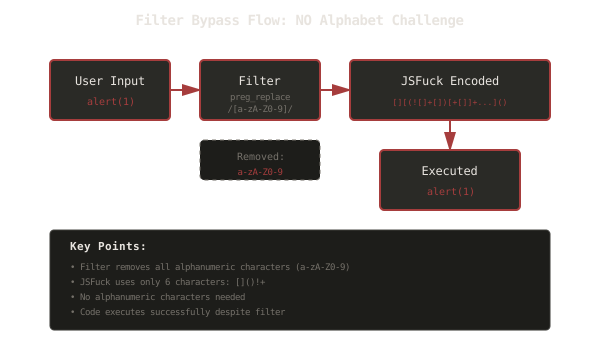
The diagram above shows the flow: user input goes through the filter, which removes all alphanumeric characters. However, by using JSFuck encoding, we can create valid JavaScript code using only the characters that pass through the filter.
What is JSFuck?
JSFuck is an esoteric programming style for JavaScript. It’s a subset of JavaScript that uses only six characters: []()!+. Despite this extreme limitation, JSFuck can represent any JavaScript program.
How JSFuck Works
JSFuck works by exploiting JavaScript’s type coercion and the fact that you can access properties and methods using bracket notation. Here’s how it builds up from basic values:
Basic Values
| JavaScript | JSFuck | Explanation |
|---|---|---|
false | ![] | Negating an empty array |
true | !![] | Double negation of an empty array |
undefined | [][[]] | Accessing non-existent property |
NaN | +[![]] | Converting false to number |
0 | +[] | Converting empty array to number |
1 | +!+[] | Converting true to number |
2 | !+[]+!+[] | Adding two ones |
10 | [+!+[]+[+[]]] | String “10” |
Building Strings
Strings are constructed character by character. For example, to get the letter ‘a’:
false→![]- Convert to string:
![]+[]→"false" - Access first character:
(![]+[])[+[]]→"f"
This process is repeated for each character needed, which is why JSFuck-encoded code can become very long.
Accessing Functions
Functions are accessed through array methods:
| JavaScript | JSFuck | Explanation |
|---|---|---|
Array | [] | Empty array |
Function | []["filter"] | Accessing filter method |
eval | []["filter"]["constructor"]("CODE")() | Constructor function that executes code |
window | []["filter"]["constructor"]("return this")() | Accessing global scope |
Why JSFuck Works for This Challenge
The filter removes all alphanumeric characters, but JSFuck only uses:
[and]- square brackets(and)- parentheses!- logical NOT+- unary plus or addition
None of these characters are alphanumeric, so they all pass through the filter unchanged!
The Solution
To solve the challenge, we need to encode JavaScript code in JSFuck. For demonstration purposes, we can use alert(1) (which is shorter), but alert('XSS') would work the same way - it would just be longer. The encoded payload for alert(1) is:
[][(![]+[])[+[]]+(![]+[])[!+[]+!+[]]+(![]+[])[+!+[]]+(!![]+[])[+[]]][([][(![]+[])[+[]]+(![]+[])[!+[]+!+[]]+(![]+[])[+!+[]]+(!![]+[])[+[]]]+[])[!+[]+!+[]+!+[]]+(!![]+[][(![]+[])[+[]]+(![]+[])[!+[]+!+[]]+(![]+[])[+!+[]]+(!![]+[])[+[]]])[+!+[]+[+[]]]+([][[]]+[])[+!+[]]+(![]+[])[!+[]+!+[]+!+[]]+(!![]+[])[+[]]+(!![]+[])[+!+[]]+([][[]]+[])[+[]]+([][(![]+[])[+[]]+(![]+[])[!+[]+!+[]]+(![]+[])[+!+[]]+(!![]+[])[+[]]]+[])[!+[]+!+[]+!+[]]+(!![]+[])[+[]]+(!![]+[][(![]+[])[+[]]+(![]+[])[!+[]+!+[]]+(![]+[])[+!+[]]+(!![]+[])[+[]]])[+!+[]+[+[]]]+(!![]+[])[+!+[]]]((![]+[])[+!+[]]+(![]+[])[!+[]+!+[]]+(!![]+[])[!+[]+!+[]+!+[]]+(!![]+[])[+!+[]]+(!![]+[])[+[]]+([][(![]+[])[+[]]+(![]+[])[!+[]+!+[]]+(![]+[])[+!+[]]+(!![]+[])[+[]]]+[])[+!+[]+[!+[]+!+[]+!+[]]]+[+!+[]]+([+[]]+![]+[][(![]+[])[+[]]+(![]+[])[!+[]+!+[]]+(![]+[])[+!+[]]+(!![]+[])[+[]]])[!+[]+!+[]+[+[]]])()
This looks completely incomprehensible, but when executed, it calls alert(1). Note: While we use alert(1) here for brevity, the same technique works with alert('XSS') - it would just generate a longer payload.
How to Generate JSFuck Code
You don’t need to manually construct JSFuck code. Tools like jsfuck.com can convert regular JavaScript code into JSFuck format. Simply paste your JavaScript code, and it will generate the JSFuck-encoded version.
Optimizing Payload Length
One significant challenge with JSFuck is that the encoded code becomes extremely long. For example:
alert("XSS")→ 10,823 characters in JSFuckalert(document.domain)→ ~3,000 characters in JSFuck
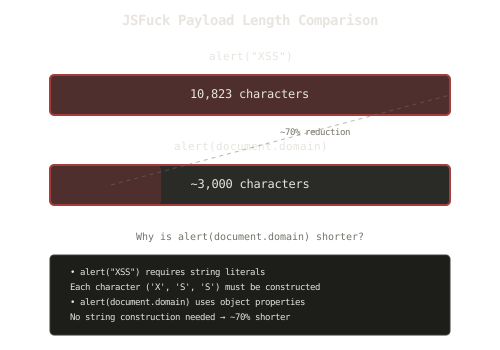
The diagram above shows the dramatic difference in payload length. Why is alert(document.domain) so much shorter?
Why alert(document.domain) is Better
String Literals are Expensive
When you use alert("XSS"), JSFuck must construct the string "XSS" character by character:
- Each character (‘X’, ‘S’, ‘S’) must be built from scratch
- This requires many operations and results in thousands of characters
Object Properties are Shorter
When you use alert(document.domain):
documentis a global object (accessible viawindow)domainis a property ofdocument- No string construction is needed
- The code is approximately 70% shorter
Practical Implications
The length difference matters for several reasons:
-
URL Length Limits: Browsers and servers have URL length limits (typically 2,048 characters). A 10,000+ character payload might be truncated.
-
Input Field Limits: Some applications limit input field length, which could truncate long payloads.
-
Detection: Shorter payloads are less likely to be flagged by security systems.
-
Reliability: Shorter payloads are more likely to execute completely without being cut off.
JSFuck Conversion Comparison
| Original Code | JSFuck Length | Why It’s Long/Short |
|---|---|---|
alert("XSS") | ~10,823 chars | String literal requires character-by-character construction |
alert(document.domain) | ~3,000 chars | Uses object properties, no string construction |
alert(1) | ~1,200 chars | Simple numeric value, minimal construction (used for brevity) |
alert('XSS') | ~10,823 chars | String literal requires character-by-character construction |
prompt(1) | ~1,500 chars | Similar to alert, but function name is longer |
Key Insight: Avoid string literals in JSFuck payloads whenever possible. Use object properties, numbers, or other values that don’t require string construction.
Security Lessons
This challenge teaches several important security lessons:
1. Character Filtering is Not Enough
Simply removing certain characters doesn’t prevent XSS attacks. Attackers can use encoding techniques, alternative syntax, or esoteric programming styles to bypass filters.
Better Approach: Use proper output encoding based on context (HTML encoding, JavaScript encoding, URL encoding, etc.)
2. Defense in Depth
Relying on a single security control (like character filtering) is risky. Multiple layers of defense are more effective:
- Input validation
- Output encoding
- Content Security Policy (CSP)
- Proper use of secure APIs (e.g.,
textContentinstead ofinnerHTML)
3. Understand the Attack Surface
To defend against attacks, you need to understand how they work. Learning about techniques like JSFuck helps you:
- Recognize when filters are insufficient
- Implement better security controls
- Test your defenses against advanced techniques
4. Context Matters
The same filtering approach won’t work in all contexts. A filter that removes alphanumeric characters might seem effective, but it doesn’t account for:
- Encoding techniques (JSFuck, Base64, Unicode, etc.)
- Alternative syntax
- DOM manipulation
- Event handlers
Filter Bypass Strategies Comparison
| Strategy | Characters Used | Use Case | Length | Detection Difficulty |
|---|---|---|---|---|
| JSFuck | []()!+ | Alphanumeric filter | Very long | Medium |
| Unicode encoding | Various Unicode | Character restrictions | Medium | Low |
| HTML entities | &#xNN; | HTML context | Medium | Low |
| Event handlers | onerror, onload | Script tag filter | Short | Low |
| Template literals | Backticks | String restrictions | Medium | Medium |
Key Takeaways
-
Character filtering alone is insufficient: Attackers can use encoding techniques to bypass filters.
-
JSFuck demonstrates filter limitations: Using only 6 characters, any JavaScript can be encoded.
-
Payload optimization matters: Using object properties instead of string literals can reduce payload size by 70%.
-
Defense requires multiple layers: Don’t rely on a single security control.
-
Context-aware protection: Different contexts require different protection strategies.
-
Understanding attacks improves defense: Learning bypass techniques helps build better defenses.
Next Steps
Now that you understand how JSFuck can bypass character filters, you can:
- Try the challenge yourself: easy01.php
- Experiment with jsfuck.com to see how different code translates
- Practice optimizing payloads (try
alert(document.domain)vsalert("test")) - Learn about other encoding techniques (Base64, Unicode, HTML entities)
- Study Content Security Policy (CSP) as a more effective defense
Remember: The goal isn’t just to bypass filters - it’s to understand why simple filtering fails and how to implement proper security controls. Every bypass technique you learn helps you build more secure applications.
Related Articles
Bypassing Quotes Filters: String.fromCharCode() to the Rescue
December 20, 2025
Learn how String.fromCharCode() can bypass filters that remove quotes, and why filtering specific characters isn't enough for XSS protection
Bypassing Parentheses Filters: Template Literals to the Rescue
December 19, 2025
Learn how JavaScript template literals can bypass filters that remove parentheses, and why filtering specific characters isn't enough for XSS protection
Learning XSS Through Practice: Baby Challenge Walkthrough
December 16, 2025
A beginner-friendly walkthrough of three XSS challenges that teach you exactly what Cross-Site Scripting is and how it works through hands-on practice