Understanding XSS: Cross-Site Scripting Basics
Cross-Site Scripting, commonly known as XSS, is one of the most prevalent web application vulnerabilities. It consistently ranks in the OWASP Top 10 list of critical security risks, making it essential knowledge for developers, security professionals, and anyone involved in building web applications. Understanding XSS isn’t just about learning how to exploit vulnerabilities - it’s about understanding how web applications process user input and how to build secure systems that protect against these attacks.
In this article, I’ll walk you through what XSS is, the different types of XSS attacks, practical examples of how they work, and the fundamental defense strategies that can prevent them. Whether you’re new to web security or looking to deepen your understanding, this guide will provide a solid foundation for recognizing and defending against XSS vulnerabilities.
What is XSS?
Cross-Site Scripting (XSS) is a security vulnerability that allows attackers to inject malicious scripts into web pages viewed by other users. The core principle behind XSS is deceptively simple: everything sent to a server is just text. The vulnerability occurs when an application takes user-supplied input and renders it in a way that allows the browser to interpret it as executable code rather than plain text.
At its heart, XSS is about manipulation. An attacker takes what should be harmless text input and crafts it in such a way that when the application processes and displays it, the browser executes it as JavaScript code. This manipulation transforms innocent user input into a vehicle for malicious code execution.
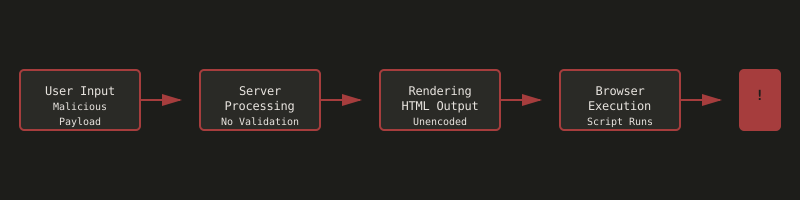
The diagram above illustrates the typical flow of an XSS attack: malicious user input is processed by the server without proper validation, rendered in the HTML output without encoding, and finally executed by the browser as JavaScript code.
Why XSS is Dangerous
XSS attacks can have severe consequences for both users and applications:
Session Hijacking: Attackers can steal session cookies and authentication tokens, gaining unauthorized access to user accounts. This is often accomplished by injecting JavaScript that sends cookies to an attacker-controlled server.
Account Takeover: Stolen credentials can lead to complete account compromise. Attackers can use XSS to inject fake login forms that capture user credentials or modify account settings.
Data Theft: Sensitive user data, including personal information, payment details, and private messages, can be exfiltrated through XSS payloads.
Malware Distribution: XSS payloads can redirect users to malicious websites or trigger downloads of malware, particularly effective when the XSS is persistent.
Business Impact: The consequences extend beyond individual users:
- Data breaches leading to regulatory fines (GDPR, CCPA)
- Loss of customer trust and reputation damage
- Legal liability for security failures
- Financial losses from fraud and recovery costs
Real-World Impact
XSS vulnerabilities have been responsible for numerous high-profile security incidents:
- 2018 British Airways breach: XSS vulnerabilities contributed to the theft of 380,000 payment card details
- 2015 eBay XSS attack: Persistent XSS affected millions of users
- Multiple CMS platforms: XSS vulnerabilities have been exploited to deface websites and steal data
Types of XSS
XSS attacks are generally categorized into three main types, each with distinct characteristics and attack vectors:
| Type | Persistence | Server Interaction | Detection Difficulty | Common Locations | Example Scenarios |
|---|---|---|---|---|---|
| Stored XSS | Yes | Yes | Easy | Databases, forums, comments, user profiles | Malicious script stored in database, executed for all users viewing content |
| Reflected XSS | No | Yes | Medium | URL parameters, search results, error messages | Payload in URL reflected in response, requires user to click malicious link |
| DOM-based XSS | No | No | Hard | Client-side JavaScript, URL hash, DOM manipulation | Payload never sent to server, executed entirely in browser |
Stored XSS (Persistent XSS)
Stored XSS occurs when malicious scripts are permanently stored on the target server, typically in a database. The payload is saved and then executed every time the affected content is viewed. This makes stored XSS particularly dangerous because it can affect multiple users over an extended period without requiring the attacker to craft specific requests for each victim.
Common locations for stored XSS include:
- User comments in forums or blogs
- Product reviews and ratings
- User profiles and display names
- Chat messages and user-generated content
- Database entries that are displayed to other users
Once the payload is stored, it will execute for anyone who views the compromised content, making it highly effective for widespread attacks.
Reflected XSS (Non-Persistent XSS)
Reflected XSS occurs when malicious scripts are reflected in the application’s response, typically through URL parameters or form submissions. Unlike stored XSS, the payload is not permanently stored on the server - it’s immediately reflected back to the user who triggered it.
Common scenarios include:
- Search functionality that displays the search term
- Error messages that include user input
- URL parameters that are displayed in the response
- Form submissions that echo back user input
Reflected XSS requires the victim to click a malicious link or submit a malicious form, making it less persistent but still dangerous, especially when combined with social engineering.
DOM-based XSS
DOM-based XSS is a type of XSS attack where the vulnerability exists in client-side code rather than server-side code. The malicious payload is executed as a result of modifying the DOM environment in the victim’s browser, without the payload being sent to the server.
This type of XSS is particularly interesting because:
- The attack happens entirely on the client side
- The server may not be aware that an attack occurred
- Traditional server-side filtering may not prevent it
- It relies on unsafe JavaScript practices that manipulate the DOM with user-controlled data
Basic XSS Examples
Understanding XSS requires seeing how these attacks work in practice. Let’s explore some basic examples, starting with the simplest cases and progressing to more sophisticated techniques.
Simple Cases
The most straightforward XSS attack involves directly injecting a script tag into an unfiltered input field:
Warning: The following code demonstrates a basic XSS attack. This should never be executed on systems you don’t own.
<script>alert('XSS')</script>When this input is processed by a vulnerable application and rendered in the HTML, the browser will execute the JavaScript code, displaying an alert. While this example is harmless (just showing an alert), the same technique can be used to execute any JavaScript code, including code that steals cookies, modifies page content, or redirects users to malicious sites.
This simple approach works when:
- Input fields have no filtering or validation
- The application directly renders user input without encoding
- No Content Security Policy (CSP) is implemented
- The input is placed in a context where script tags are executed
Filtered Cases
Most modern applications implement some form of filtering to prevent basic XSS attacks. Backends often filter or remove <script> tags, especially for persistent storage like comments, forum posts, or user profiles. This filtering is crucial because stored XSS can affect many users over time.
However, filtering alone is not sufficient. Input validation should occur in both the frontend and backend:
- Frontend validation: Provides immediate feedback to users and prevents some attacks
- Backend validation: Essential security control that cannot be bypassed by disabling JavaScript or modifying requests
The key principle is that all user input must be treated as untrusted, regardless of where it comes from. For a web application, it’s not always clear whether input comes from a legitimate user, another server, or an automated attack. Everything is just text, and proper filtering and encoding are necessary to ensure it remains harmless.
Creative Bypasses
When <script> tags are filtered, attackers often turn to event handlers in HTML tags. These event handlers can execute JavaScript when specific events occur, such as when an image fails to load or when a page element is clicked.
Common event handler-based XSS payloads include:
<img src=x onerror=alert('XSS')>This payload creates an image tag with an invalid source (x). When the image fails to load, the onerror event handler executes the JavaScript code.
<svg onload="alert('XSS')">SVG elements can also execute JavaScript through event handlers like onload.
<body onload="alert('XSS')">The body tag’s onload event fires when the page loads.
<input onfocus="alert('XSS')" autofocus>Input fields with autofocus will trigger the onfocus event handler automatically.
<marquee onstart="alert('XSS')">Even deprecated HTML elements like <marquee> can be used for XSS if they support event handlers.
These examples demonstrate why simple tag filtering is insufficient. Attackers can use various HTML elements and event handlers to execute JavaScript, making comprehensive input validation and output encoding essential.
URL-based XSS
XSS can also be injected through URL parameters. This is particularly common with reflected XSS, where the payload is included in the URL and reflected in the response.
A common technique involves closing existing HTML tags and then adding event handlers:
"' onerror='alert('XSS')'"This payload can be appended to URL parameters that are rendered in the page. If the application constructs HTML like:
<img src="USER_INPUT">The payload would result in:
<img src="" onerror='alert('XSS')'>When the image fails to load (because src="" is empty), the onerror handler executes the JavaScript.
DOM-based XSS Explained
To understand DOM-based XSS, we first need to understand what the DOM is.
What is the DOM?
The Document Object Model (DOM) is a programming interface for HTML and XML documents. It represents the page structure as a tree of objects that can be manipulated with JavaScript. When a web page loads, the browser creates a DOM representation of the HTML, and JavaScript can access and modify this structure.
For example, JavaScript can:
- Read element content:
document.getElementById('username').textContent - Modify element attributes:
element.href = newValue - Create new elements:
document.createElement('div') - Change page structure dynamically
How DOM-based XSS Differs
DOM-based XSS differs from stored and reflected XSS in several important ways:
- Client-side only: The vulnerability exists in client-side JavaScript code, not server-side code
- No server interaction: The malicious payload may never be sent to the server
- DOM manipulation: The attack works by manipulating the DOM environment using user-controlled data
- Harder to detect: Traditional server-side logging may not capture the attack
A typical DOM-based XSS vulnerability might look like this:
Warning: The following code is vulnerable to XSS attacks.
// Vulnerable code
var userInput = location.hash.substring(1); // Get value from URL hash
document.getElementById('message').innerHTML = userInput; // Dangerous!
If an attacker crafts a URL like example.com#<img src=x onerror=alert('XSS')>, the JavaScript code takes the value from the URL hash and inserts it directly into the DOM using innerHTML, which will execute the JavaScript.
The key difference is that this manipulation happens entirely in the browser - the server never sees the malicious payload, making it difficult to detect and prevent using traditional server-side security measures.
Advanced Techniques: Context and Bypasses
As applications implement more sophisticated filtering, attackers develop corresponding bypass techniques. Understanding these advanced concepts helps both in recognizing vulnerabilities and in implementing effective defenses.
Breaking Out of String Context
A common scenario in XSS attacks occurs when user input lands inside a JavaScript string parameter. For example, consider code like:
startTimer('USER_INPUT');If an attacker simply tries to inject a script tag, it won’t work because the input is inside a string. The challenge becomes breaking out of the string context to execute code.
When quotes are escaped (converted to ' or similar), direct injection doesn’t work. However, JavaScript’s string concatenation operators (+ and -) can be used creatively. These operators allow you to break out of the string context and execute JavaScript expressions.
Before (Vulnerable Code):
startTimer('USER_INPUT'); // Input is safely inside stringAfter (Exploited):
startTimer(''-alert('XSS')-''); // String concatenation executes alert('XSS')The general approach is to use operators that will cause JavaScript to evaluate an expression during string concatenation. When JavaScript encounters something like '' + alert('XSS') + '', it evaluates alert('XSS') as part of the string concatenation operation, effectively executing the code.
How it works:
- The
-operator triggers JavaScript to evaluate both sides '' - alert('XSS') - ''becomes: empty string minus the result ofalert('XSS')minus empty string- During evaluation,
alert('XSS')executes before the subtraction occurs - This breaks out of the string context and executes the malicious code
This technique demonstrates why understanding the context where user input is used is crucial for both attackers and defenders. The same input might be safe in one context but dangerous in another.
DOM-based XSS via href Attributes
A common vulnerability pattern involves taking URL parameter values and assigning them directly to href attributes:
// Vulnerable pattern
document.getElementById('link').href = getQueryParam('next');
If an attacker can control the URL parameter, they can use the javascript: protocol to execute code:
?next=javascript:alert('XSS')
When a user clicks the link, the browser executes the JavaScript code in the javascript: protocol handler.
When javascript: is filtered, attackers may use various bypass techniques:
- Case variations:
Javascript:,JavaScript:,JAVASCRIPT: - Encoding:
java%0ascript:(null byte),java%09script:(tab character) - Whitespace variations: Different types of whitespace characters
These bypasses exploit the fact that filtering is often case-sensitive or doesn’t account for encoding variations.
Data URI as Alternative
When the javascript: protocol is filtered, attackers may turn to data: URIs as an alternative. Data URIs allow embedding data directly in URLs using the format:
data:[<mediatype>][;base64],<data>
For JavaScript execution, the format becomes:
data:text/javascript,CODE_HERE
Data URIs work by telling the browser to interpret the URI content as the specified media type. When used in contexts like href attributes or src attributes, they can execute JavaScript code even when javascript: protocol is blocked.
This technique is useful for attackers because:
- It bypasses
javascript:protocol filters - It’s supported by all modern browsers
- It can encode the payload in various ways (plain text, base64)
Understanding data URIs helps developers recognize another potential attack vector and implement appropriate filtering.
Learning Resources
While understanding the theory behind XSS is important, hands-on practice is essential for truly grasping how these attacks work and how to defend against them.
Google XSS Game: The Google XSS Game is an excellent hands-on learning resource designed specifically for developers new to security. It presents a series of challenges that teach real-world XSS concepts through practical exercises. Each level introduces different XSS scenarios, from basic injection to more advanced techniques involving context manipulation and filter bypasses.
What makes the Google XSS Game particularly valuable is that it:
- Presents realistic vulnerability scenarios
- Provides hints and source code to guide learning
- Covers various XSS types and techniques
- Encourages understanding the underlying concepts rather than just memorizing payloads
The game is designed to be educational, helping developers recognize common coding patterns that lead to XSS vulnerabilities. By working through the challenges yourself, you’ll develop a deeper understanding of how XSS attacks work and how to spot vulnerable code patterns in your own applications.
I highly recommend working through the Google XSS Game as a complement to reading about XSS. The hands-on experience of identifying vulnerabilities, crafting payloads, and understanding why they work (or don’t work) is invaluable for building practical security knowledge.
Framework Protection: Do Modern Frameworks Protect Against XSS?
A common question developers ask is whether modern web frameworks automatically protect against XSS attacks. The short answer is: it depends on how you use them. Many frameworks provide built-in protections, but these protections can be bypassed if you don’t understand how they work or if you use unsafe functions.
Framework Features That Help
Many popular frameworks include automatic escaping mechanisms that significantly reduce XSS risk:
Django (Python): Django’s template system automatically escapes variables by default. When you use {{ variable }} in templates, Django HTML-escapes the content, converting characters like < to < and > to >. This makes stored and reflected XSS much harder to achieve.
Flask (Python): Flask uses Jinja2 templates, which also escape by default. The {{ variable }} syntax automatically escapes HTML entities.
Fiber (Go): Go’s html/template package provides automatic escaping. When using {{.Variable}} in templates, the content is automatically escaped for HTML context.
React: React automatically escapes values when rendering. When you use {variable} in JSX, React escapes the content, preventing XSS. React also escapes attribute values automatically.
Vue.js: Vue’s template syntax automatically escapes interpolated content. Using {{ variable }} in templates escapes HTML entities.
Angular: Angular automatically sanitizes and escapes content in templates, providing protection against XSS.
Why You Still Need to Be Careful
Despite these built-in protections, XSS vulnerabilities can still occur if developers:
Use unsafe functions: Many frameworks provide “unsafe” or “raw” rendering functions that bypass automatic escaping. For example:
- Django:
{{ variable|safe }}or{% autoescape off %} - Flask/Jinja2:
{{ variable|safe }} - React:
dangerouslySetInnerHTML - Vue:
v-htmldirective
These functions are necessary in some cases (like rendering trusted HTML content), but they should be used with extreme caution and only with data that you’ve explicitly validated and sanitized.
Manipulate the DOM directly: Server-side frameworks can’t protect against DOM-based XSS. If your JavaScript code uses innerHTML, document.write(), or similar functions with user-controlled data, you’re vulnerable regardless of your server-side framework.
Use JavaScript template literals unsafely: Modern JavaScript frameworks don’t protect you if you construct HTML or JavaScript code using template literals with user input:
// Vulnerable - even in React/Vue applications
const html = `<div>${userInput}</div>`;
element.innerHTML = html; // XSS vulnerability!
Bypass framework protections: Some developers intentionally bypass framework protections, thinking they know better, or because they don’t understand why the framework is escaping their content.
Rely solely on frontend frameworks: Client-side frameworks like React and Vue protect against XSS when rendering, but if your backend API doesn’t validate or sanitize input, you might store XSS payloads that could be exploited through other means or in different contexts.
Common Mistakes Even With Frameworks
Here are some common patterns that lead to XSS vulnerabilities despite using secure frameworks:
Django Example - Using |safe filter incorrectly:
Vulnerable code:
# VULNERABLE
{{ user_comment|safe }}  # Bypasses Django's automatic escaping!
Secure code:
# SECURE
{{ user_comment }}  # Django automatically escapes
React Example - Using dangerouslySetInnerHTML:
// VULNERABLE
<div dangerouslySetInnerHTML={{__html: userInput}} />

// SECURE
<div>{userInput}</div>  // React automatically escapes
JavaScript Example - Direct DOM manipulation:
// VULNERABLE - even in React/Vue apps
document.getElementById('content').innerHTML = userInput;

// SECURE
document.getElementById('content').textContent = userInput;
Go/Fiber Example - Using html/template incorrectly:
// VULNERABLE
tmpl.Execute(w, map[string]interface{}{
    "Content": template.HTML(userInput), // Bypasses escaping!
})

// SECURE
tmpl.Execute(w, map[string]interface{}{
    "Content": userInput, // Automatically escaped
})
Best Practices
Even when using frameworks with built-in XSS protection:
- Always use the framework’s safe rendering methods by default - Don’t bypass escaping unless absolutely necessary
- Understand when escaping happens automatically - Know which template syntax or functions provide automatic escaping
- Validate and sanitize input - Don’t rely solely on output encoding; validate input as well
- Avoid unsafe functions - If you must use
dangerouslySetInnerHTML,|safe, or similar, ensure the data is from a trusted source and has been sanitized - Be extra careful with DOM manipulation - Server-side frameworks can’t protect against client-side XSS
- Use Content Security Policy (CSP) - Even with framework protections, CSP adds an additional layer of defense
- Keep frameworks updated - Security improvements and fixes are regularly released
Remember: Framework protections are tools that help you, but they’re not magic. Understanding how XSS works and how your framework protects against it (or doesn’t) is essential for building truly secure applications. The framework can’t protect you if you bypass its protections or use unsafe patterns.
Framework Protection Comparison
| Framework | Auto-Escaping | Unsafe Functions | DOM Protection | Best Practice |
|---|---|---|---|---|
| Django | Yes (default) | {{ var|safe }}, {% autoescape off %} | No | Use {{ variable }} by default, avoid |safe |
| Flask | Yes (Jinja2) | {{ var|safe }} | No | Use {{ variable }} by default, avoid |safe |
| Fiber/Go | Yes (html/template) | template.HTML() | No | Use {{.Variable}} by default, avoid template.HTML() |
| React | Yes (JSX) | dangerouslySetInnerHTML | No | Use {variable} by default, avoid dangerouslySetInnerHTML |
| Vue.js | Yes (templates) | v-html directive | No | Use {{ variable }} by default, avoid v-html |
| Angular | Yes (templates) | [innerHTML] binding | No | Use interpolation by default, avoid [innerHTML] |
Defense Strategies
Understanding XSS attacks is only half the battle - knowing how to prevent them is equally important. Effective XSS defense requires a multi-layered approach, as no single technique is sufficient on its own.
Input Validation
Input validation is the first line of defense. All user input should be validated both in the frontend and backend:
Frontend validation provides immediate feedback to users and can prevent some attacks, but it should never be relied upon as the sole security measure. Attackers can easily bypass frontend validation by disabling JavaScript, modifying requests, or using tools like Burp Suite.
Backend validation is essential and cannot be bypassed. The backend should:
- Validate input format and type
- Check for potentially malicious patterns
- Enforce length limits
- Use whitelisting rather than blacklisting when possible
Output Encoding
Always encode output when rendering user-supplied data. The encoding method depends on the context where the data is used:
- HTML context: Encode HTML entities (
<becomes<,>becomes>) - JavaScript context: Encode for JavaScript strings
- URL context: URL encode the data
- CSS context: Encode for CSS
Most modern frameworks provide built-in encoding functions. Use them consistently, and never use dangerous functions like innerHTML with unencoded user input.
Content Security Policy (CSP)
Content Security Policy is a security standard that helps prevent XSS attacks by controlling which resources can be loaded and executed. CSP headers tell the browser to:
- Block inline scripts and styles
- Restrict script sources to trusted domains
- Prevent the use of
eval()and similar functions - Control which protocols can be used (blocking
javascript:protocol)
Implementing CSP can significantly reduce the risk of XSS attacks, even if other defenses fail.
Defense in Depth
The key principle of XSS defense is defense in depth - using multiple layers of security controls. No single technique is perfect, but combining input validation, output encoding, CSP, and other security measures creates a robust defense that can withstand various attack techniques.
Remember: For a web application, everything is just text. The application can’t always distinguish between legitimate user input, server-to-server communication, or malicious payloads. Proper filtering, validation, and encoding ensure that text remains harmless, regardless of its source or intent.
Conclusion
Cross-Site Scripting remains one of the most common and dangerous web application vulnerabilities. Understanding XSS is essential for anyone involved in web development or security, not just to exploit vulnerabilities, but to build secure applications that protect users.
Key takeaways from this article:
- XSS is about manipulation: Attackers manipulate text input to be interpreted as executable code
- Context matters: The same input can be safe in one context but dangerous in another
- Multiple attack vectors: XSS can occur through stored data, reflected responses, or DOM manipulation
- Defense requires multiple layers: Input validation, output encoding, and CSP work together to prevent attacks
- Everything is text: Applications must filter and encode all user input because they can’t always distinguish legitimate from malicious input
The best way to truly understand XSS is through hands-on practice. I encourage you to work through the Google XSS Game, experiment in safe environments, and apply these concepts to your own code. By understanding how XSS attacks work, you’ll be better equipped to write secure code and recognize vulnerabilities in applications you’re testing or maintaining.
Security is not a one-time task - it’s an ongoing process that requires vigilance, education, and the willingness to learn from both successes and failures. As you continue your journey in web security, remember that understanding the attacker’s perspective is one of the most valuable skills you can develop.
Related Articles
Bypassing Quotes Filters: String.fromCharCode() to the Rescue
December 20, 2025
Learn how String.fromCharCode() can bypass filters that remove quotes, and why filtering specific characters isn't enough for XSS protection
Bypassing Parentheses Filters: Template Literals to the Rescue
December 19, 2025
Learn how JavaScript template literals can bypass filters that remove parentheses, and why filtering specific characters isn't enough for XSS protection
Bypassing Filters with JSFuck: When Character Restrictions Aren't Enough
December 18, 2025
Learn how JSFuck can bypass filters that remove alphanumeric characters, and why simple character filtering is insufficient for XSS protection